Shopify Payment Gateways in Kenya - Shopify payments
Feb 19, 2022
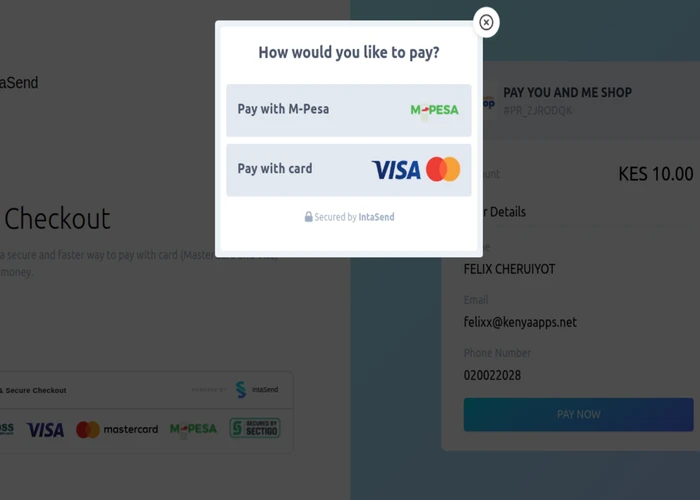
If M-Pesa isn't one of the payment methods on your Shopify store in Kenya, you're losing sales. Over 90% of Kenyan adults use mobile money, and M-Pesa holds 90.8% market share. Without it, you're excluding the majority of your potential customers.
But M-Pesa alone isn't enough—especially if you're targeting customers outside Kenya or accepting corporate payments. Your Shopify store needs multiple payment options to maximize conversions.
This guide shows you how to accept M-Pesa, Visa, Mastercard, Google Pay, Apple Pay, and CashApp on your Kenyan Shopify store using one payment gateway. Plus, you'll get the complete setup process and troubleshooting tips.
Quick Comparison: Shopify Payment Gateways in Kenya
Feature | IntaSend | Other Options |
|---|---|---|
M-Pesa Support | ✅ Native STK Push | ⚠️ Limited or None |
Cards | ✅ Visa/Mastercard | ✅ Usually Available |
Google/Apple Pay | ✅ Yes | ❌ Rarely Available |
PesaLink | ✅ Yes | ❌ No |
Local Support | ✅ Nairobi-based | ❌ International teams |
Setup Time | 30-60 minutes | 3-7 days |
Kenyan Merchants | 5,000+ | Varies |
Language | English & Swahili | English only |
IntaSend is purpose-built for Kenyan e-commerce, with M-Pesa as the priority—not an afterthought.
Why Shopify Stores in Kenya Need IntaSend
The Shopify Payments Problem
Shopify Payments—the platform's default payment gateway—doesn't work in Kenya. Kenyan merchants must use a third-party payment gateway from Shopify's approved provider list.
Most international payment gateways either:
Don't support M-Pesa at all
Treat M-Pesa as a secondary option
Lack local customer support
Have slow setup processes (3-7 days)
IntaSend solves all of these problems.
What Makes IntaSend Different
Built for Kenya, Not Adapted for It
Unlike pan-African or global payment gateways adapted for the Kenyan market, IntaSend was designed specifically for Kenyan businesses from day one. M-Pesa integration is native, not bolted on.
Multiple Payment Methods, One Integration
Install the IntaSend Payments app once, and your customers automatically get six payment options:
M-Pesa (primary method for Kenyan customers)
Visa (corporate cards, international customers)
Mastercard (corporate cards, international customers)
Google Pay (growing among smartphone users)
Apple Pay (premium segment)
CashApp (US-based customers)
Local Support That Speaks Your Language
When you have questions or issues, you're talking to a Nairobi-based team that understands Kenyan business challenges. Support available in English and Swahili via WhatsApp, email, and phone.
Fast Setup
Complete verification and start accepting payments within 24-48 hours. Compare that to 5-7 days (or longer) with international providers.
Customer feedback consistently highlights IntaSend as the best payment gateway for Shopify merchants in Kenya.
How Payment Gateways Work on Shopify
A payment gateway is software that processes customer payments on your Shopify store. It acts as a secure intermediary between:
Your customer (making a payment)
Their bank or mobile money provider
Your business account
When a customer checks out on your Shopify store, the payment gateway:
Captures their payment details securely
Verifies funds are available
Processes the transaction
Sends confirmation to both you and the customer
Deposits funds to your account
All of this happens automatically in seconds—no manual intervention needed.
Why Your Shopify Store Needs Multiple Payment Methods
Cart abandonment in Kenyan e-commerce stores averages 70%+. One of the biggest reasons? Limited payment options.
The Math:
Customer fills cart with KES 5,000 worth of products
Reaches checkout
Only sees Visa/Mastercard options
Doesn't have a card or card is declined
Abandons cart
You lose the sale
With Multiple Payment Methods:
Customer sees M-Pesa, Visa, Mastercard, Google Pay, Apple Pay
Card fails? They try M-Pesa
M-Pesa balance low? They try Google Pay
Multiple backup options = completed sale
According to our merchant data, Shopify stores that offer M-Pesa alongside cards see 40-60% fewer abandoned carts.
Read more: Why Kenyans Abandon Your Checkout on Valentine's Day
Step-by-Step: How to Set Up IntaSend on Your Shopify Store
What You'll Need
Active Shopify store
Email address
Kenyan phone number
Business documentation (for verification)
Total setup time: 30-60 minutes
Step 1: Create Your IntaSend Account
Go to IntaSend.com
Click "Sign Up"
Enter your email and phone number
Verify your phone via OTP
Choose your business type:
Sole proprietor
Partnership
Limited company
Unregistered business
Non-profit
Note: You can start accepting payments even without company registration. Read: Payment Gateway for Unregistered Businesses
Step 2: Install the IntaSend Payments App
Show Image
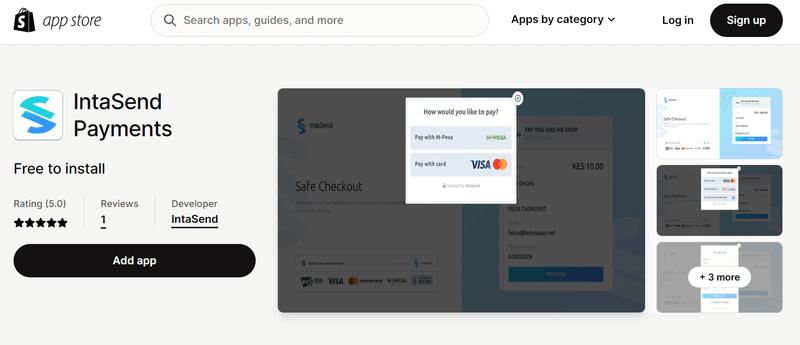
Go to the Shopify App Store
Search for "IntaSend Payments"
Click Add App
Review permissions
Click Install App
You'll be redirected to the IntaSend setup page.
Step 3: Connect Your IntaSend Account
Click Complete Setup
Enter the phone number you used for your IntaSend account
Generate your API keys:
Go to IntaSend Dashboard
Navigate to Settings → API Keys
Copy your Public Key
Generate and copy your API Token (save this securely—it's shown only once)
Paste both keys into the Shopify setup page
Click Submit
Step 4: Select Payment Methods
Show Image
Choose which payment methods to display at checkout:
M-Pesa (recommended)
Visa
Mastercard
Google Pay
Apple Pay
CashApp
Pro tip: Enable all methods. More options = higher conversion rates.
Step 5: Test & Activate
Enable Test Mode
Make a test purchase on your store
Verify payment flows correctly
Check that confirmation emails are sent
Once satisfied, disable test mode
Click Activate IntaSend Payment Gateway
You're live! Your Shopify store can now accept payments.
Step 6: Complete KYC Verification
To withdraw funds, you'll need to complete Know Your Customer (KYC) verification:
Required documents:
National ID or Passport
Business registration certificate (if registered)
KRA PIN certificate
Verification time: 24-48 hours
This is a regulatory requirement to protect your funds and comply with Central Bank of Kenya regulations.
Real Results from Kenyan Shopify Merchants
Western Cosmetics: 62% More Conversions
Western Cosmetics, a Kenyan beauty products store on Shopify, was losing sales due to failed card payments. After switching to IntaSend and adding M-Pesa:
62% increase in completed checkouts
40% reduction in cart abandonment
Faster settlement to restock inventory
What Merchants Say
"The experience has been seamless, efficient, and hassle-free. One thing that makes IntaSend stand out is the platform's ability to collect payments from anywhere in the world."
— Felistas Njihia, Felin Solutions
"Our experience with IntaSend has been remarkable. The integration process was quite smooth with proper API documentation."
— Kelvin Muriuki, CEO, taka.earth
"@intaSendHQ I am currently blown away by your product. The documentation is so developer friendly as opposed to one pan-African payment gateway, market leader. Good job!"
— @Matinde on Twitter
See more: Customer Success Stories
Common Shopify Payment Problems (And How IntaSend Solves Them)
Problem 1: High Cart Abandonment
Cause: Only card payments available; most Kenyans don't have cards
Solution: IntaSend adds M-Pesa—used by 90% of Kenyan adults
Problem 2: Failed Payments
Cause: Card declines, insufficient funds, expired cards
Solution: Multiple payment method backups reduce failed transactions by 40-60%
Problem 3: Slow Customer Support
Cause: International payment gateways in different timezones
Solution: IntaSend's Nairobi-based team responds in under 1 hour during business hours
Problem 4: Complicated Setup
Cause: Complex API integration, unclear documentation
Solution: IntaSend's Shopify app installs in 30-60 minutes with step-by-step guides
Problem 5: No M-Pesa Integration
Cause: Most international gateways don't support M-Pesa
Solution: IntaSend was built for M-Pesa from day one—native STK Push integration
Advanced Features for Growing Shopify Stores
Subscription Products
Selling subscription boxes or recurring services? IntaSend integrates with Shopify subscription apps for automated recurring billing.
Read: Subscription Payments in Kenya
Split Payments for Multi-Vendor Stores
Running a marketplace on Shopify? IntaSend's split payment infrastructure automatically distributes revenue to multiple vendors.
Read: Split Payments Infrastructure: 9 Best Use Cases
Shopify Markets (International Selling)
Expanding to other African markets? IntaSend supports:
Kenya (M-Pesa, Airtel Money, cards)
Uganda (Mobile Money, cards)
Tanzania (Mobile Money, cards)
Business Payments & Payouts
Need to pay suppliers or employees? Use your IntaSend account to:
Send bulk payouts to M-Pesa
Schedule recurring payments
Pay international contractors
Pricing & Fees
IntaSend charges transparent, per-transaction fees with no hidden costs:
No setup fees
No monthly fees
No minimum transaction volumes
Competitive transaction rates
You only pay when you make sales.
Security & Compliance
PCI DSS Level 1 Compliant
IntaSend is certified to the highest level of payment card industry security standards.
Licensed Through Banking Partners
All banking services are securely provided by IntaSend's licensed banking partners who are members of deposit insurance schemes, ensuring the safety of your funds.
3D Secure 2.0
Card payments use 3DS2 authentication for maximum fraud protection.
Data Encryption
End-to-end encryption protects all payment information.
Read more: Payment Security Basics Every Merchant Should Know
Troubleshooting Common Issues
"Payment failed" error for customers
Causes:
Insufficient M-Pesa balance
Card declined by bank
Wrong PIN entered
Solution: IntaSend shows clear error messages. Customers can retry immediately with a different payment method.
Funds not appearing in IntaSend account
Causes:
Transaction still processing
Compliance review in progress
Solution: Contact IntaSend support via WhatsApp (+254 711 082 947) for status updates.
Cannot withdraw funds
Causes:
KYC verification incomplete
Compliance review pending
Solution: Complete KYC verification. For established businesses, settlement terms can be customized.
Frequently Asked Questions
Does Shopify Payments work in Kenya?
No. Shopify Payments is only available in select countries (US, Canada, UK, Australia, and a few others). Kenya is not currently supported. All Kenyan Shopify merchants must use a third-party payment gateway.
How do I add M-Pesa to my Shopify store?
Install the IntaSend Payments app from the Shopify App Store. M-Pesa is automatically enabled along with cards and other payment methods. No additional integration needed.
How long does IntaSend setup take?
30-60 minutes for installation and configuration. Account verification takes an additional 24-48 hours. You can start accepting test payments immediately.
What are the transaction fees?
IntaSend charges competitive per-transaction fees with no setup or monthly costs. View current pricing
Can I accept payments from customers outside Kenya?
Yes. IntaSend supports Visa, Mastercard, Google Pay, Apple Pay, and CashApp—all accepted internationally. Currency conversion is handled automatically.
Do I need a registered business to use IntaSend?
No. IntaSend supports unregistered businesses, sole proprietors, freelancers, and individuals. You'll need identification and to complete KYC verification, but formal business registration isn't mandatory.
How long does it take to receive my money?
Funds are subject to standard verification and compliance procedures. Settlement terms can be customized based on your business track record. Contact IntaSend to discuss faster settlement options.
Can I use IntaSend with Shopify Plus?
Yes. IntaSend works with all Shopify plans, including Shopify Plus.
What happens if a customer's payment fails?
IntaSend displays clear error messages and allows immediate retry. Customers can switch to a different payment method without leaving checkout. This reduces abandonment compared to gateways that require starting over.
Does IntaSend support Shopify POS?
Currently, IntaSend focuses on online payments. For in-person sales, use Shopify's POS with supported hardware.
Why Kenyan Shopify Merchants Choose IntaSend
Built for Kenya - M-Pesa as a priority, not an afterthought
Local support - Nairobi-based team, English & Swahili
Fast setup - 30-60 minutes vs 3-7 days
Multiple payment methods - 6 options in one integration
Proven results - 5,000+ merchants, 62% conversion increases
Transparent pricing - No hidden fees
Excellent documentation - Developer-friendly API guides
Active development - Regular feature updates
Ready to Accept Payments on Your Shopify Store?
Get started in 3 steps:
Sign up for IntaSend (free, 2 minutes)
Install the Shopify app (30-60 minutes)
Start accepting M-Pesa, cards, and mobile wallets
Need help?
WhatsApp: +254 711 082 947
Email: support@intasend.com
Hours: Monday-Friday, 8 AM - 6 PM EAT
Sign Up Free | View Pricing | Request Demo
Related Resources
Integration Guides:
Business Guides:
Success Stories:
Developer Resources: